

Introduction#
Organizations with hybrid environments face a recurring challenge: how do branch offices, data centers, and remote workers resolve private DNS records hosted in Route 53 Private Hosted Zones? The traditional answer involves VPN tunnels or Direct Connect, Resolver Endpoints in every region, conditional forwarders, and manual failover strategies. It works, but the operational overhead scales poorly.
In March 2026, AWS launched Route 53 Global Resolver — a managed, internet-reachable DNS resolver that provides authenticated resolution of both public and private domains through global anycast IP addresses. No VPN required. No Resolver Endpoints to manage per region. No manual failover.
In this post, we’ll look at the problem Global Resolver solves, how it works under the hood, and deploy a hands-on demo that resolves a private hosted zone from an on-premises machine using nothing but a dig command over the public internet.
The Problem: Hybrid DNS Is Hard#
The classic approach#
To resolve Route 53 Private Hosted Zones from on-premises, the traditional architecture looks like this:
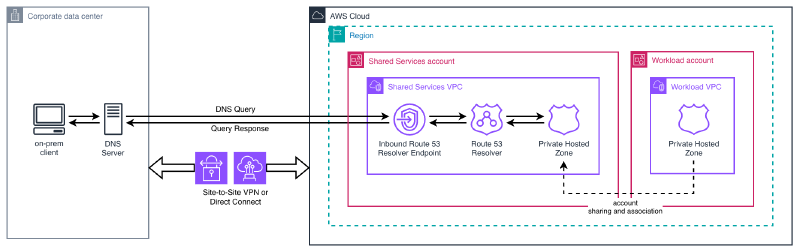
For each AWS region where you need DNS resolution, you deploy:
- A VPN connection or Direct Connect link from each office to the VPC
- An Inbound Resolver Endpoint (minimum 2 ENIs) to accept queries from on-premises
- A conditional forwarder on the on-premises DNS server pointing private domains to the inbound endpoint IPs
- DNS Firewall rules to filter malicious queries (per VPC)
- Cross-account PHZ association via RAM so the resolver VPC can access hosted zones in workload accounts
For high availability across regions, you replicate this entire setup and implement your own failover logic — typically by health-checking Resolver Endpoints and updating on-premises forwarders manually or through automation.
Pain points#
This architecture has well-known operational challenges:
- Complexity at scale: Conditional forwarders must be configured at every office, PHZs shared cross-account via RAM, and DNS Firewall rules duplicated across VPCs.
- Manual failover: If a region becomes unavailable, DNS resolution breaks until you redirect traffic to another region’s endpoints.
- Cumulative cost: Each ENI costs $0.125/hour. A minimal two-region setup with inbound endpoints requires 4 ENIs — roughly $360/month just for the endpoints, before VPN or Direct Connect costs.
- Fragmented security: DNS Firewall rules are scoped to individual VPCs. Maintaining consistent policies across multiple VPCs and regions requires careful orchestration.
- No support for remote workers: Users outside the corporate network need a full VPN connection just to resolve internal DNS names.
Route 53 Global Resolver: How It Works#
Core architecture#
Route 53 Global Resolver takes a fundamentally different approach. Instead of requiring private connectivity to reach Resolver Endpoints inside a VPC, it exposes a set of global anycast IPv4 addresses on the public internet that any authenticated client can query directly.
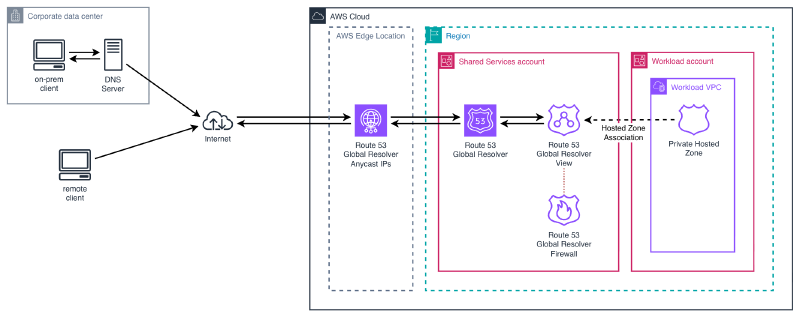
The key architectural properties:
- Global service, regional presence: You select at least 2 AWS regions for the resolver. Anycast routing automatically directs each query to the nearest healthy region.
- Automatic failover: If a region becomes unavailable, queries are transparently rerouted to the next closest region. Clients don’t need to change anything.
- API in us-east-2: All management operations (create, update, delete) go through the Ohio region, regardless of where the resolver operates. This is similar to how CloudFront distributions are managed from us-east-1.
- Split-horizon resolution: The same resolver handles both public internet domains (via recursive resolution) and private domains (via associated Private Hosted Zones).
Key components#
| Component | Purpose |
|---|---|
| Global Resolver | The main instance. Defines which regions to deploy in and the IP address type (IPv4 or dual-stack). |
| DNS View | A logical grouping of clients with its own authentication, firewall rules, and hosted zone associations. Think of it as a policy container. |
| Access Source | An IP/CIDR allowlist tied to a DNS view. Defines who can query and which protocol they use (Do53, DoH, or DoT). |
| Access Token | Token-based authentication for DoH and DoT clients. Supports expiration and revocation. |
| Firewall Rules | DNS filtering using custom domain lists, AWS Managed Domain Lists, or advanced threat detection (DGA, DNS tunneling). |
| Hosted Zone Association | Links a Private Hosted Zone to a DNS view, enabling the resolver to answer queries for that zone. |
Authentication is mandatory#
Unlike a traditional DNS resolver, Global Resolver requires every client to authenticate. There are two mechanisms:
- Access Sources (IP/CIDR allowlists): Compatible with all protocols — Do53 (UDP port 53), DoT (port 853), and DoH (port 443). You register the public IP ranges of your offices or data centers.
- Access Tokens: For DoH and DoT only. You generate tokens with configurable expiration periods and distribute them to clients. Tokens can be revoked at any time.
This means you can’t accidentally expose your private DNS to the internet — only explicitly authorized clients get responses.
Integrated DNS Firewall#
Global Resolver includes DNS Firewall capabilities equivalent to what Route 53 Resolver DNS Firewall provides for VPCs, but applied globally across all clients:
- AWS Managed Domain Lists: Pre-built threat intelligence lists covering malware, phishing, botnets, spam, and GuardDuty threat feeds. Content categories (social media, gambling) are also available.
- Custom domain lists: Your own block/allow lists, either inline or imported from S3.
- Advanced threat detection: Algorithmic analysis that detects DNS tunneling and Domain Generation Algorithms (DGA) in real-time, without relying on known-bad domain lists.
- Actions: Each rule can ALLOW, BLOCK (with NODATA, NXDOMAIN, or custom override), or ALERT (log and pass through).
Split-horizon DNS#
When a query arrives, Global Resolver checks whether the domain matches any Private Hosted Zone associated with the client’s DNS view:
- Private domain → resolves from the associated PHZ
- Public domain → performs standard recursive resolution against public nameservers, with optional DNSSEC validation
This eliminates the need for separate forwarding infrastructure to handle the split between private and public resolution.
Demo: Resolving Private Domains from On-Premises#
Let’s deploy a working Global Resolver and verify that we can resolve a private hosted zone from an on-premises machine over the public internet — no VPN, no Direct Connect, no Resolver Endpoints.
What we’ll build#
The CloudFormation template deploys:
- A Private Hosted Zone (
demo.internal) with two A records - A Global Resolver operating in eu-west-1 and eu-central-1
- A DNS View with DNSSEC validation and EDNS Client Subnet enabled
- An Access Source allowing our public IP to query via Do53
- A Firewall Rule blocking test malware domains
- A Hosted Zone Association linking the PHZ to the DNS view
CloudFormation template#
You can access the complete template here:
The template deploys all resources in a single stack targeting us-east-2. It uses three parameters:
| Parameter | Description | Default |
|---|---|---|
AllowedCidr | Your public IP in CIDR notation | (required) |
ResolverRegions | The two regions for the resolver | eu-west-1,eu-central-1 |
PrivateZoneName | Domain for the private hosted zone | demo.internal |
Deployment#
First, determine your public IP address. This is the IP that Global Resolver will use to authenticate your queries:
MY_IP=$(curl -s https://ifconfig.me)
echo "My public IP: ${MY_IP}"
Now deploy the stack. Note that we must target us-east-2 — this is where the Global Resolver control plane lives, regardless of which regions the resolver operates in:
aws cloudformation deploy \
  --template-file template.yaml \
  --stack-name route53-global-resolver-demo \
  --parameter-overrides AllowedCidr="${MY_IP}/32" \
  --region us-east-2
Deployment takes approximately 3-5 minutes. Once complete, retrieve the anycast IP addresses assigned to your resolver:
aws cloudformation describe-stacks \
  --stack-name route53-global-resolver-demo \
  --region us-east-2 \
  --query 'Stacks[0].Outputs[?OutputKey==`AnycastIPv4Addresses`].OutputValue' \
  --output text
You’ll get two IPv4 addresses — these are the global anycast IPs that you’ll configure on your on-premises DNS clients. Both addresses route to the same resolver; having two provides client-side redundancy.
Verification#
With the anycast IPs from the stack outputs, we can now test resolution from our on-premises machine. No VPN, no Direct Connect — just standard DNS queries over the public internet.
Resolve a private domain:
$ dig @15.197.252.50 app.demo.internal +short
10.0.1.50

$ dig @15.197.252.50 db.demo.internal +short
10.0.2.30
This is the key result: our on-premises machine resolves records from a Route 53 Private Hosted Zone — over the public internet, authenticated only by our source IP address. No VPN tunnel, no Direct Connect link, no Resolver Endpoints.
Resolve a public domain:
$ dig @15.197.252.50 google.com +short
172.217.20.238
Public DNS resolution works transparently through the same resolver. This is the split-horizon behavior in action — private domains resolve from the associated PHZ, everything else goes through standard recursive resolution.
Test firewall blocking:
$ dig @15.197.252.50 malware-test.demo.invalid +short
(empty response - NODATA)
The firewall rule intercepts the query and returns an empty answer (NODATA), preventing resolution of domains on our block list. In production, you’d use AWS Managed Domain Lists to block known malware, phishing, and botnet domains without maintaining your own lists.
Verify both anycast IPs work:
$ dig @99.83.237.198 app.demo.internal +short
10.0.1.50
Both anycast addresses route to the resolver and return identical results. If one region becomes unavailable, traffic automatically fails over to the other — clients don’t need to change their DNS configuration.
Cleanup#
aws cloudformation delete-stack \
  --stack-name route53-global-resolver-demo \
  --region us-east-2

aws cloudformation wait stack-delete-complete \
  --stack-name route53-global-resolver-demo \
  --region us-east-2
VPC Resolver vs. Global Resolver: When to Use Each#
With the launch of Global Resolver, AWS renamed the existing service to Route 53 VPC Resolver to clarify the distinction. They are complementary — not competing — services.
| Aspect | VPC Resolver | Global Resolver |
|---|---|---|
| Connectivity | VPN/Direct Connect required | Public internet (authenticated) |
| Configuration | Inbound Endpoints + conditional forwarders | DNS Views (global, per client group) |
| DNS Security | DNS Firewall per VPC | Integrated firewall (global) |
| Failover | Manual, multi-region | Automatic (anycast) |
| Access to PHZs | Only from associated VPCs | From anywhere (authenticated) |
| Protocols | Do53 (DoH on endpoints) | Do53, DoH, DoT |
| Authentication | Private network (VPN/DX) | IP allowlist + access tokens |
| Logging | Per VPC, per region | Centralized (OCSF format) |
| Cost (2 regions) | ~$360/month (4 ENIs) + VPN/DX | ~$3,600/month (all inclusive) |
Decision guide#
Use VPC Resolver when:
- Your workloads run inside VPCs and need to resolve both AWS and on-premises domains
- You already have VPN or Direct Connect connectivity
- You need to forward queries to on-premises DNS servers (outbound resolution)
- Cost is a primary concern and your DNS architecture is simple
Use Global Resolver when:
- You have clients outside AWS (branch offices, data centers, remote workers) that need to resolve private domains
- You want to eliminate VPN dependencies for DNS resolution
- You need automatic multi-region failover without custom automation
- You want centralized DNS security policies across all client locations
- You need encrypted DNS (DoH/DoT) for clients on untrusted networks
Use both together:
Most enterprise architectures will use VPC Resolver for cloud-native workloads inside VPCs and Global Resolver for everything external. The two services operate independently and complement each other.
Considerations and Limitations#
Before adopting Global Resolver, consider these trade-offs:
Cost: At ~$3,600/month for a two-region deployment with DNS filtering, Global Resolver is a significant investment. It’s justifiable when it replaces multiple VPN tunnels, Resolver Endpoints across several regions, and the operational overhead of managing failover — but do the TCO math for your specific environment.
Management API region: All control plane operations go through us-east-2 (Ohio). If that region experiences issues, you cannot create or modify resolver resources. However, the data plane (actual DNS resolution) continues operating in your configured regions independently.
Infrastructure as Code: As of April 2026, the Terraform AWS provider does not have native resources for Global Resolver. CloudFormation has full support, CDK offers L1 constructs, and the awscc Terraform provider works via Cloud Control API. Plan your IaC strategy accordingly.
Region changes require replacement: Modifying the Regions property on a Global Resolver triggers a full replacement (delete + recreate). Plan your region selection carefully at deployment time.
Quotas: Default limits include 2 resolvers per account, 5 DNS views per resolver, and 1,000 access sources per resolver. These are adjustable through Service Quotas.
Not a VPC Resolver replacement: Workloads inside VPCs still use VPC Resolver for their DNS resolution. Global Resolver targets clients outside the VPC perimeter.
Opt-in regions: If you want to deploy the resolver in opt-in regions (like eu-south-2 or ap-southeast-3), the account must have those regions enabled first.
Wrapping Up#
Route 53 Global Resolver addresses a long-standing pain point in hybrid DNS architectures: resolving private domains from outside AWS without the complexity of VPN tunnels and regional Resolver Endpoints. By exposing authenticated anycast IPs on the public internet, it turns what used to be a multi-component, multi-region infrastructure problem into a single managed service with automatic failover.
The integrated DNS Firewall, support for encrypted protocols (DoH/DoT), and centralized logging make it particularly compelling for organizations with distributed offices and remote workers who need both private DNS access and consistent security policies.
The main trade-off is cost. At ~$3,600/month for a basic two-region deployment, it’s not a fit for every environment. But for organizations already spending on VPN infrastructure, multiple Resolver Endpoints, and the engineering time to maintain DNS failover — the total cost of ownership comparison may surprise you.