


Running microservices across multiple VPCs means solving the same problems over and over: how does Service A discover Service B, who is allowed to call it, and how do you know when something goes wrong? The typical answer involves a Network Load Balancer per service, a PrivateLink endpoint per consumer VPC, a Route 53 record per environment, and a security group rule that nobody remembers adding. It works. It just doesn’t scale — and it tells you nothing when something breaks.
Amazon VPC Lattice takes a different approach. Instead of combining individual network primitives, it gives you a managed service that works at Layer 7 of the OSI model. You publish the service once, discovery happens by DNS name — no IPs involved — and, most importantly, the service is protected by IAM policies. It’s no longer about allowing specific traffic flows; it’s about validating that the caller actually has permission to consume the service.
In this post, we’re going to dig into the L7 pattern end to end: publishing a service, controlling access with auth policies, and signing service-to-service requests with SigV4A.
VPC Lattice: two connectivity models#
VPC Lattice solves two related but distinct problems, and it uses different constructs for each.
The first is service-to-service connectivity at Layer 7: a microservice in one VPC needs to call an HTTP API in another, with authentication, authorization, and DNS-based discovery. This is the Services model — listeners, rules, target groups, and auth policies.
The second is TCP resource connectivity across overlapping CIDRs: a workload needs to reach a backend over TCP, but the two VPCs share the same address space and direct routing is not possible. This is the Resource Configurations model — resource gateways, resource configurations, and implicit SNAT. We covered this pattern in depth in VPC Lattice: Full NAT for Third-Party Connectivity.
| Services | Resource Configurations | |
|---|---|---|
| Protocol | HTTP / HTTPS / gRPC | TCP |
| Implicit NAT | Yes | Yes |
| Auth policies (IAM) | Yes | No |
| Custom domain + ACM | Yes | No |
| Target types | IP, Lambda, ALB, Instance | IP, DNS, ARN |
| Use case | Internal microservices | Third-party / CIDR overlap |
This post focuses on the Services model. If your use case is TCP connectivity with overlapping CIDRs, the Full NAT post is the right starting point.
Core components#
Service Network#
A Service Network is the central organizational unit in VPC Lattice. Think of it as a shared connectivity plane: services register into it, VPCs connect to it, and everything associated with the same Service Network can communicate — subject to the auth policies you configure.
VPCs connect to a Service Network in two ways, and the difference matters:
- VPC Association: the VPC is directly associated with the Service Network. Only traffic originating inside that VPC can reach the services registered in it. It is not transitive — traffic arriving from outside (via Transit Gateway, VPN, or Direct Connect) cannot use this path.
- Service Network Endpoint (SNE): a VPC Endpoint of type
ServiceNetworkcreated inside the VPC. Unlike a VPC Association, it allows transitive traffic — requests arriving from other networks can reach the Service Network through it.
For a single-region deployment where consumers live in the same VPC, a VPC Association is all you need. The Service Network Endpoint becomes relevant when traffic arrives from outside the VPC — through a Transit Gateway, VPN, or cross-region network — since a VPC Association is not transitive.
Services, Listeners, and Target Groups#
A VPC Lattice Service is the unit of publication: it represents a single application or API endpoint that you want to make accessible through the Service Network. Consumers discover it by DNS name and communicate with it over HTTP, HTTPS, or gRPC — the underlying IP addresses are irrelevant.
A Service is composed of three building blocks:
- Listener: defines the protocol (
HTTPorHTTPS) and port the service accepts traffic on. An HTTPS listener requires an AWS Certificate Manager (ACM) certificate — we’ll cover that in the next section. - Rules: routing rules evaluated on each incoming request. The default rule forwards all traffic to a target group, but you can add path-based or header-based rules to route to different backends.
- Target Group: the set of backends the service forwards traffic to. VPC Lattice supports four target types:
IP— individual IP addressesLambda— AWS Lambda functionsALB— an Application Load Balancer in the same VPCInstance— EC2 instances by instance ID
For ECS workloads, the cleanest integration is an ALB target: register the service’s Application Load Balancer as the target, and let the ALB handle task registration and health checking natively. VPC Lattice routes to the ALB, which forwards to the healthy ECS tasks.
Custom domains and DNS resolution#
By default, VPC Lattice assigns each service an auto-generated domain name in the form service-name-<random>.vpc-lattice-svcs.<region>.on.aws. This domain is publicly resolvable and always points to the VPC Lattice data plane — no private DNS needed.
In most real-world deployments, however, you want a human-readable custom domain: something like service-b.internal.example.com that your application code can reference without hardcoding the generated name. VPC Lattice supports custom domains on HTTPS listeners, with two requirements:
- An ACM certificate that covers the custom domain, in the same region as the service.
- A DNS record that resolves the custom domain to the VPC Lattice service’s generated domain.
The DNS record is where most people hit their first gotcha. VPC Lattice does not create DNS records for you — you need to create them in Route 53. The recommended pattern is a Private Hosted Zone (PHZ) with an Alias record pointing to the service’s generated domain:
service-b.internal.example.com → ALIAS → service-b-<random>.vpc-lattice-svcs.eu-west-1.on.awsAnd here is the critical step that is easy to miss: the Private Hosted Zone must be associated with the consumer VPC. Without that association, DNS resolution inside the VPC falls back to the public resolver, which cannot find the private record — and the service call fails with a DNS error that looks identical to a connectivity problem.
Finally, enable access logs on both the Service Network and the Service from day one. Each log entry includes the response code, the authorization decision, and the caller’s identity — making it the fastest way to distinguish a DNS issue from an auth policy rejection from a genuine connectivity problem. We’ll lean on these logs heavily in the auth section.
Architecture#
Let’s look at the problem and what we can do about it. Service A lives in one VPC and needs to call Service B, which lives — as you’d expect — in a different VPC. Both VPCs share the same CIDR block (10.0.0.0/24), something common in poorly governed environments or as a result of acquisitions and mergers between organisations. In this case, VPC peering is not an option, and neither is any solution that relies on IP routing.
The VPC Lattice Services model solves this without touching a single IP address. Here’s how the pieces fit together:
Service B registers into a VPC Lattice Service backed by an IP target group. The service exposes an HTTPS listener on port 443, using an ACM certificate that covers a custom domain (service-b.internal.example.com). The target group points to the IP address of the Service B instance inside its VPC.
Service Network sits in the middle, acting as the connectivity plane. Service B’s VPC Lattice Service is associated with the Service Network, making it reachable to any consumer connected to it.
Service A’s VPC connects to the Service Network via a VPC Association. This gives Service A direct access to everything registered in the Service Network — no VPC peering, no route tables between the two VPCs, no awareness of the other VPC’s CIDR.
DNS resolution is handled by a Route 53 Private Hosted Zone associated with Service A’s VPC. An Alias record maps service-b.internal.example.com to the auto-generated VPC Lattice service domain. When Service A calls service-b.internal.example.com, the PHZ resolves it to the VPC Lattice data plane, which proxies the request to Service B — performing SNAT transparently. Service B sees a VPC Lattice address as the source, not Service A’s real IP.
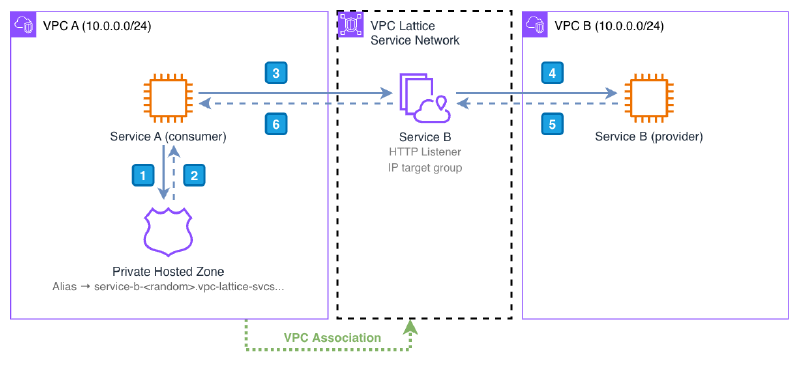
Traffic flow#
Let’s walk through what happens when Service A calls service-b.internal.example.com:
- Service A sends a DNS query for
service-b.internal.example.com. The Route 53 resolver in the VPC matches the query against the Private Hosted Zone. - The PHZ returns the auto-generated VPC Lattice service domain, which resolves to a VPC Lattice data plane address.
- Service A sends the HTTPS request. Because the VPC has a VPC Association with the Service Network, the request reaches VPC Lattice. At this point, VPC Lattice evaluates the auth policy — if the request is not allowed, it returns
403here. - VPC Lattice forwards the request to Service B (provider), routing it to the IP target registered in the target group. VPC Lattice performs SNAT — Service B sees a VPC Lattice address as the source, never Service A’s real IP.
- Service B processes the request and sends the response back through VPC Lattice.
- The response reaches Service A.
At no point is there direct IP routing between VPC A and VPC B. VPC Lattice acts as a transparent L7 proxy, and the overlapping CIDRs are completely irrelevant.
Demo#
terraform destroy when you’re done.The demo deploys a simplified version of the architecture described above:
- VPC A (
10.0.0.0/24) — consumer. An EC2 instance that calls Service B. - VPC B (
10.0.0.0/24) — provider. An EC2 instance running a Python HTTP server, exposed through VPC Lattice. - Service Network with
AWS_IAMauth type and a two-layer auth policy. - VPC Lattice Service with an HTTP listener and an
IPtarget group pointing to Instance B. - SSM VPC Endpoints in both VPCs for Session Manager access — no internet gateway needed.
Both VPCs intentionally use the same CIDR to demonstrate that VPC Lattice resolves the overlap transparently.
Deployment#
git clone https://github.com/scambelo/aws-vpc-lattice-services-demo.git
cd aws-vpc-lattice-services-demo
terraform init
terraform applyterraform output note shows the exact verification commands with the resource IDs for your deployment.Verification#
Connect to Instance A using SSM Session Manager:
aws ssm start-session --target <instance_a_id> --region <aws_region>terraform output note to get the exact commands with the correct instance_a_id and region for your deployment.Step 1 — Unsigned request (expect 403)
sh-5.2$ curl http://<service_b_domain>

AccessDeniedException: User: anonymous is not authorized to perform: vpc-lattice-svcs:Invoke
[...] because no network-based policy allows the vpc-lattice-svcs:Invoke action
The User: anonymous in the error confirms the request reached VPC Lattice but was rejected by the service network auth policy — an unsigned request carries no identity.
Step 2 — Signed request with SigV4 (expect 200)
Retrieve the instance credentials from the EC2 metadata endpoint and sign the request with curl’s built-in --aws-sigv4 flag:
sh-5.2$ TOKEN=$(curl -s -X PUT "http://169.254.169.254/latest/api/token" \
  -H "X-aws-ec2-metadata-token-ttl-seconds: 21600")

sh-5.2$ CREDS=$(curl -s -H "X-aws-ec2-metadata-token: $TOKEN" \
  http://169.254.169.254/latest/meta-data/iam/security-credentials/vpc-lattice-demo-instance-a)

sh-5.2$ export AWS_ACCESS_KEY_ID=$(echo $CREDS | python3 -c "import sys,json; print(json.load(sys.stdin)['AccessKeyId'])")
sh-5.2$ export AWS_SECRET_ACCESS_KEY=$(echo $CREDS | python3 -c "import sys,json; print(json.load(sys.stdin)['SecretAccessKey'])")
sh-5.2$ export AWS_SESSION_TOKEN=$(echo $CREDS | python3 -c "import sys,json; print(json.load(sys.stdin)['Token'])")

sh-5.2$ curl --aws-sigv4 "aws:amz:eu-west-1:vpc-lattice-svcs" \
     --user "$AWS_ACCESS_KEY_ID:$AWS_SECRET_ACCESS_KEY" \
     -H "x-amz-security-token: $AWS_SESSION_TOKEN" \
     -H "x-amz-content-sha256: UNSIGNED-PAYLOAD" \
     http://<service_b_domain>

Hello from Service B (10.0.0.x)
The response confirms end-to-end connectivity through VPC Lattice. Service B’s IP is in VPC B, which shares the same 10.0.0.0/24 CIDR as VPC A — no direct IP routing exists between the two VPCs.
curl --aws-sigv4 for simplicity. In a real application, request signing should be handled by the AWS SDK for your language. See the SigV4 and SigV4A: signing service-to-service requests section for examples in Python, Node.js, and Java.Cleanup#
terraform destroyAuth policies and Zero Trust#
Having connectivity is great, but now we need to control who can actually access the service. VPC Lattice auth policies provide service-level authorization through IAM policies — without touching application code or network ACLs.
How evaluation works#
Authorization in VPC Lattice is a logical AND across two independent policy layers:
- Caller identity policy — the IAM policy attached to the caller’s role or user must allow
vpc-lattice-svcs:Invokeon the target service. - Auth policy on the Service Network and/or Service — the resource-based policy attached to the Service Network or Service must explicitly allow the caller’s principal.
Both must allow the request. An explicit deny on either side wins, and the default when auth_type = AWS_IAM is an implicit deny — no explicit allow means no access.
This is the most common source of confusion: you can have a perfectly valid IAM identity policy and still get a 403 if the auth policy doesn’t list your principal. Always check both layers when debugging.
Two-layer pattern#
The demo uses two auth policies that mirror a real-world pattern:
Layer 1 — Service Network guardrail (coarse-grained, owned by the network team):
{
  "Effect": "Allow",
  "Principal": "*",
  "Action": "vpc-lattice-svcs:Invoke",
  "Resource": "*",
  "Condition": {
    "StringNotEquals": { "aws:PrincipalType": "Anonymous" },
    "StringEquals": { "aws:PrincipalAccount": "<account-id>" }
  }
}
This policy allows any authenticated principal from the same account. The key is the StringNotEquals condition on aws:PrincipalType — an unsigned request is treated as Anonymous, so it fails this check and gets 403. Signing the request gives it an identity that satisfies both conditions.
Layer 2 — Service policy (fine-grained, owned by the service team):
{
  "Effect": "Allow",
  "Principal": { "AWS": "arn:aws:iam::<account-id>:role/vpc-lattice-demo-instance-a" },
  "Action": "vpc-lattice-svcs:Invoke",
  "Resource": "*"
}
Only Instance A’s IAM role can invoke Service B. Any other authenticated principal in the account passes the service network guardrail but fails here.
Access logs as the primary debug tool#
Enable access logs on both the Service Network and the Service from day one. Each log entry shows the response code, the authorization decision, and the caller’s identity — making it the fastest way to distinguish a DNS issue from an auth policy rejection from a connectivity problem.
403, wait 2-3 minutes before debugging further.SigV4 and SigV4A: signing service-to-service requests#
When auth_type = AWS_IAM is enabled, callers must sign their requests using AWS Signature Version 4 (SigV4) or SigV4A. The difference matters for multi-region deployments: SigV4 requires specifying a single region, while SigV4A uses region: * — one signature valid from any AWS region. For single-region deployments either works; for cross-region patterns SigV4A is the right choice.
Two requirements apply regardless of the signing variant:
- The signing service name must be
vpc-lattice-svcs. - The request must include the header
x-amz-content-sha256: UNSIGNED-PAYLOAD— VPC Lattice does not support payload signing.
The following examples are based on the official AWS documentation. In all cases, credentials are resolved automatically from the execution environment (EC2 instance profile, Lambda execution role, ECS task role, etc.) — no hardcoded keys. The Python example uses SigV4A (region-agnostic); the Java example uses SigV4 with an explicit region — both are valid for single-region deployments.
# pip install botocore awscrt requests
from botocore import crt
from botocore.awsrequest import AWSRequest
import botocore.session
import requests

session = botocore.session.Session()
signer = crt.auth.CrtSigV4AsymAuth(
  session.get_credentials(), 'vpc-lattice-svcs', '*'  # '*' = valid from any region
)

endpoint = 'http://<service-b-domain>'
headers = {
  'Content-Type': 'application/json',
  'x-amz-content-sha256': 'UNSIGNED-PAYLOAD',  # required — VPC Lattice does not support payload signing
}

request = AWSRequest(method='GET', url=endpoint, headers=headers)
request.context['payload_signing_enabled'] = False
signer.add_auth(request)

prepped = request.prepare()
response = requests.get(prepped.url, headers=prepped.headers)
print(response.text)
// npm install aws-crt
const https = require('https')
const crt = require('aws-crt')
const { HttpRequest } = require('aws-crt/dist/native/http')
function signRequest(method, endpoint, service, algorithm) {
const host = new URL(endpoint).host
const request = new HttpRequest(method, endpoint)
request.headers.add('host', host)
request.headers.add('x-amz-content-sha256', 'UNSIGNED-PAYLOAD')
const config = {
service: service,
region: process.env.AWS_REGION || 'us-east-1',
algorithm: algorithm,
credentials: crt.auth.AwsCredentialsProvider.newDefault()
}
return crt.auth.aws_sign_request(request, config)
}
const algorithm = crt.auth.AwsSigningAlgorithm.SigV4Asymmetric
signRequest('GET', '<service-b-domain>', 'vpc-lattice-svcs', algorithm).then(
httpResponse => {
const headers = {}
for (const header of httpResponse.headers) {
headers[header[0]] = header[1]
}
const options = {
hostname: new URL('<service-b-domain>').host,
path: '/',
method: 'GET',
headers: headers
}
const req = https.request(options, res => {
res.on('data', d => process.stdout.write(d))
})
req.end()
}
)// Maven: software.amazon.awssdk:auth + software.amazon.awssdk:apache-client
import software.amazon.awssdk.auth.credentials.DefaultCredentialsProvider;
import software.amazon.awssdk.http.auth.aws.signer.AwsV4HttpSigner;
import software.amazon.awssdk.http.apache.ApacheHttpClient;
import software.amazon.awssdk.http.*;
AwsV4HttpSigner signer = AwsV4HttpSigner.create();
var credentials = DefaultCredentialsProvider.create().resolveCredentials();
SdkHttpRequest httpRequest = SdkHttpRequest.builder()
.uri(URI.create("<service-b-domain>"))
.method(SdkHttpMethod.GET)
.build();
SignedRequest signedRequest = signer.sign(r -> r
.identity(credentials)
.request(httpRequest)
.putProperty(AwsV4HttpSigner.SERVICE_SIGNING_NAME, "vpc-lattice-svcs")
.putProperty(AwsV4HttpSigner.PAYLOAD_SIGNING_ENABLED, false) // UNSIGNED-PAYLOAD
.putProperty(AwsV4HttpSigner.REGION_NAME, "eu-west-1"));
try (SdkHttpClient httpClient = ApacheHttpClient.create()) {
HttpExecuteResponse response = httpClient.prepareRequest(
HttpExecuteRequest.builder()
.request(signedRequest.request())
.build()
).call();
System.out.println(response.httpResponse().statusCode());
}Considerations and limitations#
HTTP, HTTPS, and gRPC only#
VPC Lattice Services operate exclusively at Layer 7. If your use case requires TCP connectivity — database connections, custom binary protocols, or any non-HTTP traffic — the Services model does not apply. For those scenarios, Resource Configurations with a Resource Gateway is the right tool, and it handles overlapping CIDRs just as well. We covered that pattern in VPC Lattice: Full NAT for Third-Party Connectivity.
Auth policy evaluation: the logical AND#
The most common source of confusion with VPC Lattice auth policies is understanding when both sides must agree. For a request to succeed, two independent conditions must be true:
- The caller’s IAM identity policy must allow
vpc-lattice-svcs:Invokeon the target service. - The auth policy on the Service Network and/or Service must explicitly allow the caller’s principal.
Both must allow the request. An explicit deny on either side wins. This means you can have a perfectly valid IAM identity policy and still get a 403 if the auth policy doesn’t list your principal — and vice versa. When debugging auth failures, always check both sides. The VPC Lattice access logs are the fastest way to identify which layer is rejecting the request.
VPC Association is not transitive#
A VPC Association only grants access to traffic that originates inside that VPC. If traffic arrives from outside — through a Transit Gateway, a VPN, or Direct Connect — it cannot use a VPC Association to reach the Service Network. For those scenarios, you need a Service Network Endpoint (SNE). The SNE creates ENIs with routable IPs inside the VPC, allowing transitive traffic to reach the Service Network from any connected network.
Subnet sizing for VPC Association#
When a VPC is associated with a Service Network, VPC Lattice creates Elastic Network Interfaces (ENIs) in the subnets you specify — one per Availability Zone. Each ENI consumes IP addresses from the subnet. For most deployments this is not a concern, but in VPCs with small subnets (/27 or smaller) it’s worth reserving dedicated subnets for VPC Lattice associations.
Service quotas#
A few quotas worth keeping in mind before scaling:
- Services per Service Network: 500 (soft limit, can be increased)
- VPC Associations per Service Network: 500
- Target Groups per Service: 10 (per listener rule)
Check the current quotas in the official documentation before designing for large-scale deployments.
Cost vs. NLB + PrivateLink#
VPC Lattice pricing is based on hourly endpoint costs plus per-GB data processing. For most service-to-service communication patterns, it compares favorably to the alternative:
| NLB + PrivateLink | VPC Lattice Services | |
|---|---|---|
| NLB required | Yes — one per service | No |
| Endpoint required | One per service per consumer VPC | One per Service Network per VPC |
| Auth policies | No (network-level only) | Yes (IAM-native) |
| Custom domain | Manual (Route 53 + PHZ) | Manual (Route 53 + PHZ) |
| Observability | Flow logs only | Request-level access logs |
| Protocols | TCP/UDP | HTTP / HTTPS / gRPC |
The operational advantage of VPC Lattice grows with the number of services: a single Service Network with 20 services requires one VPC Association per consumer VPC, versus 20 PrivateLink endpoints. At small scale the cost difference is minimal; at large scale VPC Lattice is cheaper and significantly simpler to operate.
Wrapping up#
The real strength of VPC Lattice over more classic setups like PrivateLink + NLB is the authorization layer. Connecting services in AWS is relatively straightforward — there are plenty of ways to do it: PrivateLink, Transit Gateway, Cloud WAN, Service Discovery… but only VPC Lattice brings a native IAM-based authorization layer into the picture. Forget about NLBs, one endpoint per service, and managing security groups to filter consumers. Publish the service, discover it by DNS, and protect it with IAM.
We’ve seen how the pieces fit together: a Service Network as the shared connectivity plane, a VPC Association to connect consumers, a Service with an HTTPS listener and target group to publish backends, a Private Hosted Zone to resolve custom domains, and auth policies with SigV4A signing to enforce Zero Trust at the service level. The overlapping CIDRs between VPC A and VPC B were never a problem — VPC Lattice performs SNAT transparently, and the underlying IP address space becomes irrelevant.
This is the single-region foundation. The same model extends naturally to transitive topologies — traffic arriving via Transit Gateway, VPN, or cross-region networks — by replacing the VPC Association with a Service Network Endpoint, which gives VPC Lattice routable IPs that any connected network can deliver traffic to.